
Today we have a solution for all those who are facing low ram issue, this is not a big solution but its better than nothing, so if your phone is lagging or you are facing minor ram issue follow this article to the end and learn how to free up some ram space, ram is one of the most important hardware in your mobile phone because with a low ram on you device you will be unable to multi-task smoothly so here is our guide on how to free up ram space on your device also note that you will need to be doing this every end of month to free up space but if you like you can do it every two months or weeks. also read how to increase android ram here
How To Clean Up Your Android Device To Make It Faster
Some of this app will require you to download a third-party app in other to free up ram space on your android device while the other method does not require any third-party apps, now follow the below methods.
#1 Make Sure You Have The Updated Phone

Well, Android update can have bug fixes and overall improvements which can help your Android smartphone to perform better. You can go to Settings>About Device> Software Update to check for any update. If you find any pending update, then make sure to update it as soon as possible.
#2 Clear App Cache Junk Files Using CCleaner:

This is one of the best cache clearing apps that lets you clear all the junk files with a single click. This can free up your storage memory up to 1GB and even more. So have a look on the below steps to clear cache and junk files using CCleaner app.
- First of all download and install this cool app CCleaner on your Android device.
- Now launch the app and click on Analyze button there and then after scanning click on Clean.
- A cache clearing process will start all your cache and junk files will get cleared.
- Your storage space may increase and our Android will starts working better.
#3 Clear App Cache & Junk Files Using SD Maid – System Cleaning Tool:
In this, you will need a rooted Android and this app works perfectly with rooted Android to remove the cache files with the deep scan of your system. This is much better than above but you just need a rooted Android.
- First of root your android device.
- Now download and install SD Maid – System Cleaning Tool.
- Grant it superuser access.
- Click on scan button and remove all the unnecessary files from your Android using this.
#4 Uninstall and disable Unused Apps
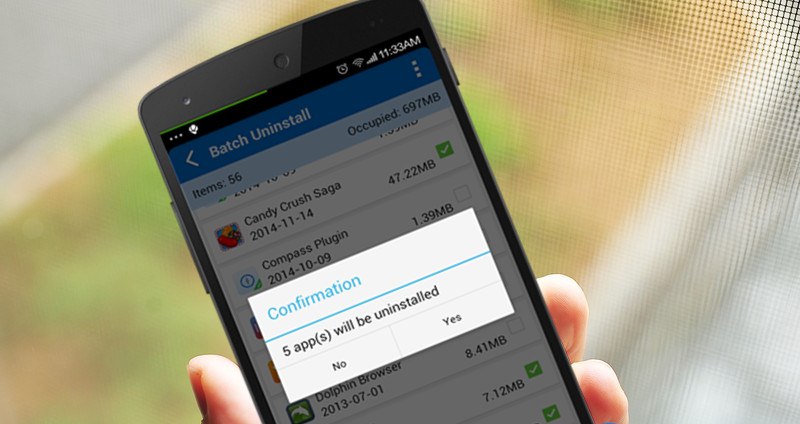
It is the boring method but it does wonders to your smartphone. You need to uninstall the unused apps. Uninstalling unused apps will not only free up your storage capacity but also free up some ram that is used by the app’s resources. To uninstall any app Go to Settings>Apps>Uninstall
#5 Reduce or Turn Off Animations

This is one of the popular method which can make your Android device to run incredibly fast. Animations make android’s performance too much sluggish and slow. Therefore, make sure to turn off or reduce the animation. You can reduce Android’s animation by going through Developer options and then reduce the animations effect.
#6 Make Use Of The Lighter Version Of App

Almost every popular apps now have a lighter version which consumes less memory and ram. Facebook Like, Twitter, Messenger Light, YouTube Go are just a few of them. These apps normally require less storage space to install and also consumes fewer resources and internet.
#7 Using Startup Manager
After cleaning all the junk and cache files, you need to clear all the apps that are loaded during the startup. This app not only makes your Android device laggy, it consumes battery life too! Therefore, make sure to manage the startup.
Startup Manager aims at helping disable/enable startup items from system boot for Android devices including smartphones and tablets. To disable an item from system startup, uncheck the application from the list (recheck to restore and it will start again). For another item that does not start with system boot, please use “Customize” to add and enable it to start with system boot.
#8 Factory Reset
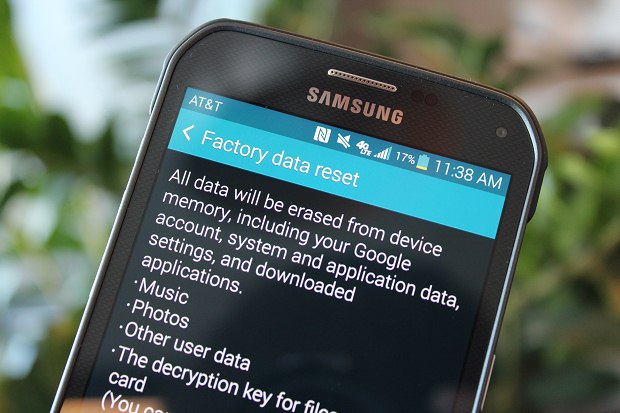
If the all above methods failed then try doing a factory reset of your Android smartphone. Factory reset is the best way to free up unused space and getting rid of many junk files.
 FREE OTT CONTENT